
Not sloppy AI cuts and captions.

The AI thatactually edits.

Pause turns your direction into a real editable Premiere project, with the original footage still under your control.

Lily the calico cat editing at her laptop

Don't take our word for it. Watch an edit done by Pause.

Press play. It's a real edit, start to finish, done by Pause.

Everything in this edit is done by Pause

  • Autocut
  • Captions
  • Zooms
  • Text animations
  • Sound effects
  • Music
  • Visual effects
  • Masking and arrows
  • Rotoscoping
Pause EditDEMO
Preview frame from the Pause demo video
0:53 demo▶ the actual workflow
watch this

You take 20 hours. Pause takes 20 minutes.

You're not slow. Editing is just busywork. Pause edits the sequence, lands the zooms, drops the SFX and scores the music, right on your timeline.

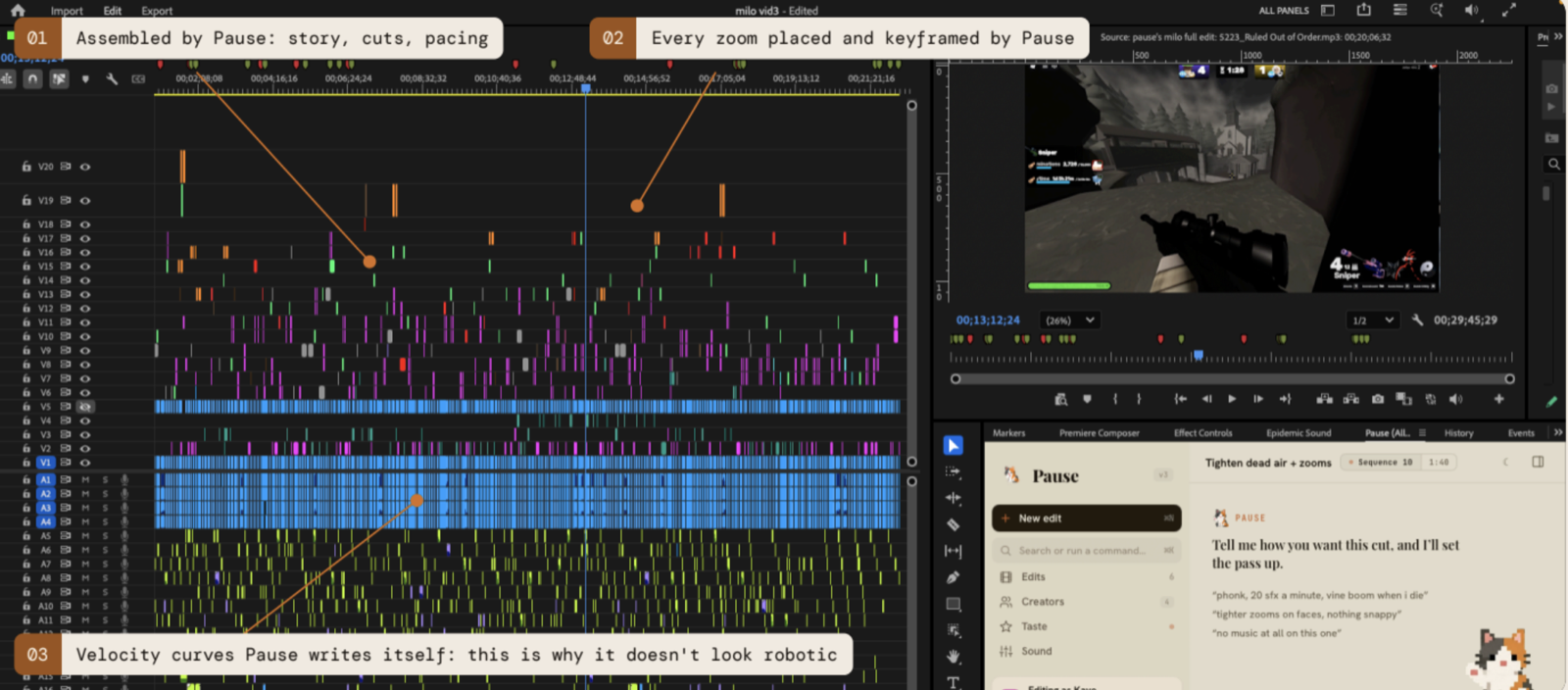
Real Premiere Pro timeline showing a completed Pause edit
20 hours -> 20 minutesreal Premiere Pro timeline

What Pause does in a video.

Every edit it makes, delivered as a real editable Premiere project.

Feature 1 · The autocut

No less than a human editor.

Keeping the personality in the video.

It listens to the audio like an editor, not like an AI. It removes every dead silence and repeated take while keeping the punchlines and the jokes.

the humanness stays there
Feature 2 · The zoom

It zooms where you'd look.

With velocity graphs.

Most tools just zoom into the middle of the frame. Pause zooms onto the exact thing that matters and follows it as it moves, speeding up and slowing down like a real editor would.

pixel perfect zooms you can drag, ease and delete

Feature 3 · The sound

Sound effects that match the emotion.

Especially on your stupid jokes.

Pause watches what is happening on screen and drops each sound effect exactly where it belongs, so the edit feels alive.

the hits, the whooshes, the impacts, right on the moment

Feature 4 · The music

Music that moves with your video.

Multiple tracks in one video, not one dropped under it.

It matches the music to the beat of the edit and lifts or softens the intensity to fit each moment. When the scene changes, the music changes with it.

different music tracks according to the vibe

Feature 5 · The visual FX

The FX you'd add by hand, already on.

The effects that make it look pro.

Pause adds the effects that make an edit look expensive, the transitions, overlays, and small touches good editors use. Each one placed where it belongs, never thrown on at random.

whatever you want, Pause does it for you

Feature 6 · The masking

Masking with arrows.

Show them exactly what to look at.

Pause dims everything else on screen, highlights the one thing that matters, and drops a clean red arrow right on it, so your viewer looks exactly where you want them to.

mask and arrows on separate layers, move or delete any time

Feature 7 · The text

It makes text look designed.

Text with style.

Clean, modern text that moves with the edit, with smooth gradients and soft glows. It looks designed, not pulled from a free preset pack lol.

every title is live text on its own track, restyle any time

Feature 8 · The roto

Rotoscoping, frame by frame.

Subjects lifted clean off the background.

Pause cuts your subject out of the shot the way a VFX artist would, frame by frame, so text and effects can slide behind them like a proper edit.

clean edges, no green screen needed

Feature 1 · The autocut

No less than a human editor.

Keeping the personality in the video.

It listens to the audio like an editor, not like an AI. It removes every dead silence and repeated take while keeping the punchlines and the jokes.

the humanness stays there

Feature 2 · The zoom

It zooms where you'd look.

With velocity graphs.

Most tools just zoom into the middle of the frame. Pause zooms onto the exact thing that matters and follows it as it moves, speeding up and slowing down like a real editor would.

pixel perfect zooms you can drag, ease and delete

Feature 3 · The sound

Sound effects that match the emotion.

Especially on your stupid jokes.

Pause watches what is happening on screen and drops each sound effect exactly where it belongs, so the edit feels alive.

the hits, the whooshes, the impacts, right on the moment

Feature 4 · The music

Music that moves with your video.

Multiple tracks in one video, not one dropped under it.

It matches the music to the beat of the edit and lifts or softens the intensity to fit each moment. When the scene changes, the music changes with it.

different music tracks according to the vibe

Feature 5 · The visual FX

The FX you'd add by hand, already on.

The effects that make it look pro.

Pause adds the effects that make an edit look expensive, the transitions, overlays, and small touches good editors use. Each one placed where it belongs, never thrown on at random.

whatever you want, Pause does it for you

Feature 6 · The masking

Masking with arrows.

Show them exactly what to look at.

Pause dims everything else on screen, highlights the one thing that matters, and drops a clean red arrow right on it, so your viewer looks exactly where you want them to.

mask and arrows on separate layers, move or delete any time

Feature 7 · The text

It makes text look designed.

Text with style.

Clean, modern text that moves with the edit, with smooth gradients and soft glows. It looks designed, not pulled from a free preset pack lol.

every title is live text on its own track, restyle any time

Feature 8 · The roto

Rotoscoping, frame by frame.

Subjects lifted clean off the background.

Pause cuts your subject out of the shot the way a VFX artist would, frame by frame, so text and effects can slide behind them like a proper edit.

clean edges, no green screen needed

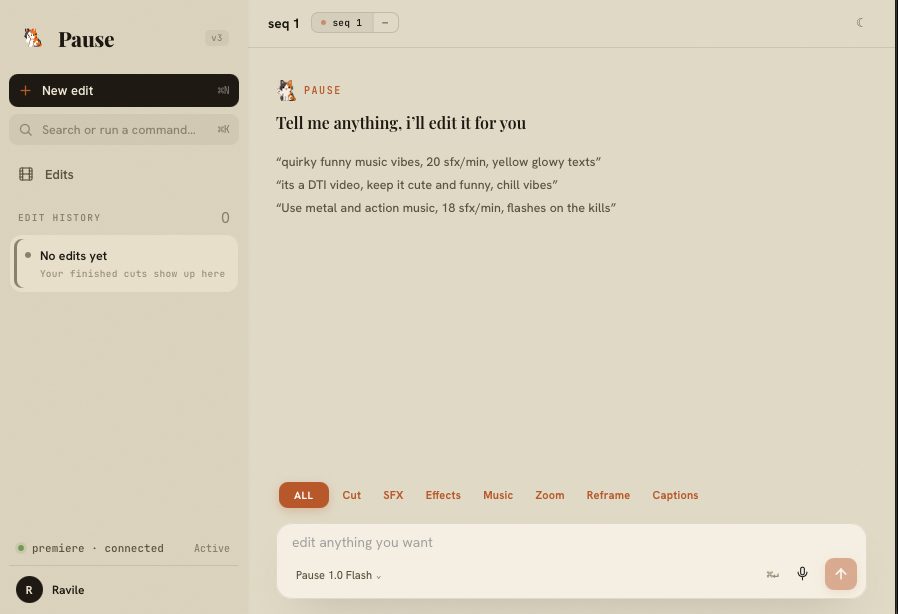
Tell Pause what to make. It builds an editable project.

Pick the creator profile, describe the vibe, and let Pause build the edit as a project you can open and refine in Premiere.

The Pause editing interface

Our models.

Pause 1.0 Flash

Less accurate · made for beginners

What it does

  • Autocut silences
  • Remove repetitions
  • Auto reframing
  • Zooms
  • Sound effects
  • Music
  • Visual effects
  • Captions

Pause 1.0 Pro

More accurate · made for pros

What it does

  • Everything in Flash, but more accurate
  • Text animations
  • Arrows and highlights
  • Masking and rotoscoping

Edit without the limits.

Start editing with Pause today.

Video counts are options. Spend your plan on Flash or Pro edits, not both totals added together.

Beginner

50% OFF · BETA

$30$15/ mo

For beginner editors.

Usage 1x

Choose Beginner
  • Either 5 Pause 1.0 Flash videos
  • or 2 Pause 1.0 Pro videos

(1 video = ~10 minutes of final edited footage)

Pro

50% OFF · BETA

$70$35/ mo

For creators who post weekly.

Usage 3x

Choose Pro
  • Either 15 Pause 1.0 Flash videos
  • or 6 Pause 1.0 Pro videos

(1 video = ~10 minutes of final edited footage)

Studio

50% OFF · BETA

$120$60/ mo

For editors who need more room.

Usage 6x

Choose Studio
  • Either 30 Pause 1.0 Flash videos
  • or 12 Pause 1.0 Pro videos

(1 video = ~10 minutes of final edited footage)

Beginner

50% OFF · BETA

$360$180/ year

For beginner editors.

Usage 1x, all year

Choose Beginner
  • Either 62 Pause 1.0 Flash videos
  • or 25 Pause 1.0 Pro videos

(1 video = ~10 minutes of final edited footage)

Pro

50% OFF · BETA

$840$420/ year

For creators who post weekly.

Usage 3x, all year

Choose Pro
  • Either 184 Pause 1.0 Flash videos
  • or 74 Pause 1.0 Pro videos

(1 video = ~10 minutes of final edited footage)

Studio

50% OFF · BETA

$1,440$720/ year

A whole year of Pause, at full power.

Usage 6x, all year

Choose Studio
  • Either 366 Pause 1.0 Flash videos
  • or 147 Pause 1.0 Pro videos

(1 video = ~10 minutes of final edited footage)

Only the finished edited video counts, not the hours of raw you upload

Secure checkoutCancel anytime

Built by an editor, for editors.

Long sessions, facecam chaos, chat going off. Exactly the footage Pause was trained to edit.

RobloxMinecraftFortniteOther games

Fair questions.

How accurate are the edits?

Editors keep the large majority of what Pause puts down. Because the result is a normal Premiere sequence, the calls you disagree with take seconds to fix. Every edit point is regular, and every zoom is a keyframe you can drag or delete.

Does my footage ever leave my computer?

Your original source stays on your computer. Pause prepares a working copy in your browser and sends that copy to its processing service to make the project. Pause does not use footage to train models.

How long does processing take?

Processing time depends on source length, browser preparation, upload speed, queue load, and the edits requested. Pause shows live progress and does not promise a turnaround it cannot verify.

Can I tweak the edit afterward?

That is the whole point. Pause hands you an editable Premiere sequence with dead air removed, zooms landed, sound placed, and music scored. You keep the taste. You skip the grind.

Will it touch my original footage?

Never. Pause builds the edit on a brand new sequence and leaves your source footage and original timeline exactly as they were. The worst thing that can happen is you delete a sequence you did not like.

Does it replace my editor?

No. It upgrades them. Pause clears twenty hours of busywork. The comedy, pacing, and taste still come from a person. A cheaper editor without Pause is still slower than your editor with it, and it shows in the upload.

What will it cost?

Three monthly plans, all 50% off for beta right now: Beginner $30 → $15/mo (1x usage), Pro $70 → $35/mo (3x), and Studio $120 → $60/mo (6x), with a 12x option at $200 → $100/mo. Yearly plans are the same 50% off: Beginner $360 → $180/year, Pro $840 → $420/year, and Studio $1,440 → $720/year (6x), with a 12x option at $2,400 → $1,200/year. Usage is your pool for Flash or Pro edits, where one video is about ten minutes of final edited footage. The pricing page has the full breakdown.

Be the first to edit with Pause.

Get 50% off for beta access.

We are picking the first 100 editors for the beta.

What interests you the most?
Videos per month?
Which tier do you want?

One email the moment your beta access is live.